ESP32 Tutorials
These tutorials will help you get started with TROPIC01 on ESP32-based platforms using Libtropic. We will go through our examples in the examples/esp32/ directory. In this directory, there are multiple subdirectories for each supported ESP32 board. Most of the instructions in this tutorial are common for all of the boards.
Hardware Setup
TROPIC01
TROPIC01 Devkit for ESP32 boards
Currently, we don't offer a devkit for ESP32 boards. However, you can use any of our devkits that use SPI, except the USB DevKit.
For the purpose of these tutorials, we will use our TROPIC01 Arduino Shield:

You can get TROPIC01 Arduino Shield and other devkits here.
Your ESP32 Board
Unfortunately, ESP32 boards and our Arduino shield are not plug-and-play, so please prepare some jump wires and use the figure above with Arduino Shield Pinout to help you during the setup. Follow the connection instructions for your ESP32 board below:
Connection Instructions
ESP32-DevKitC-V4 pin layout here.
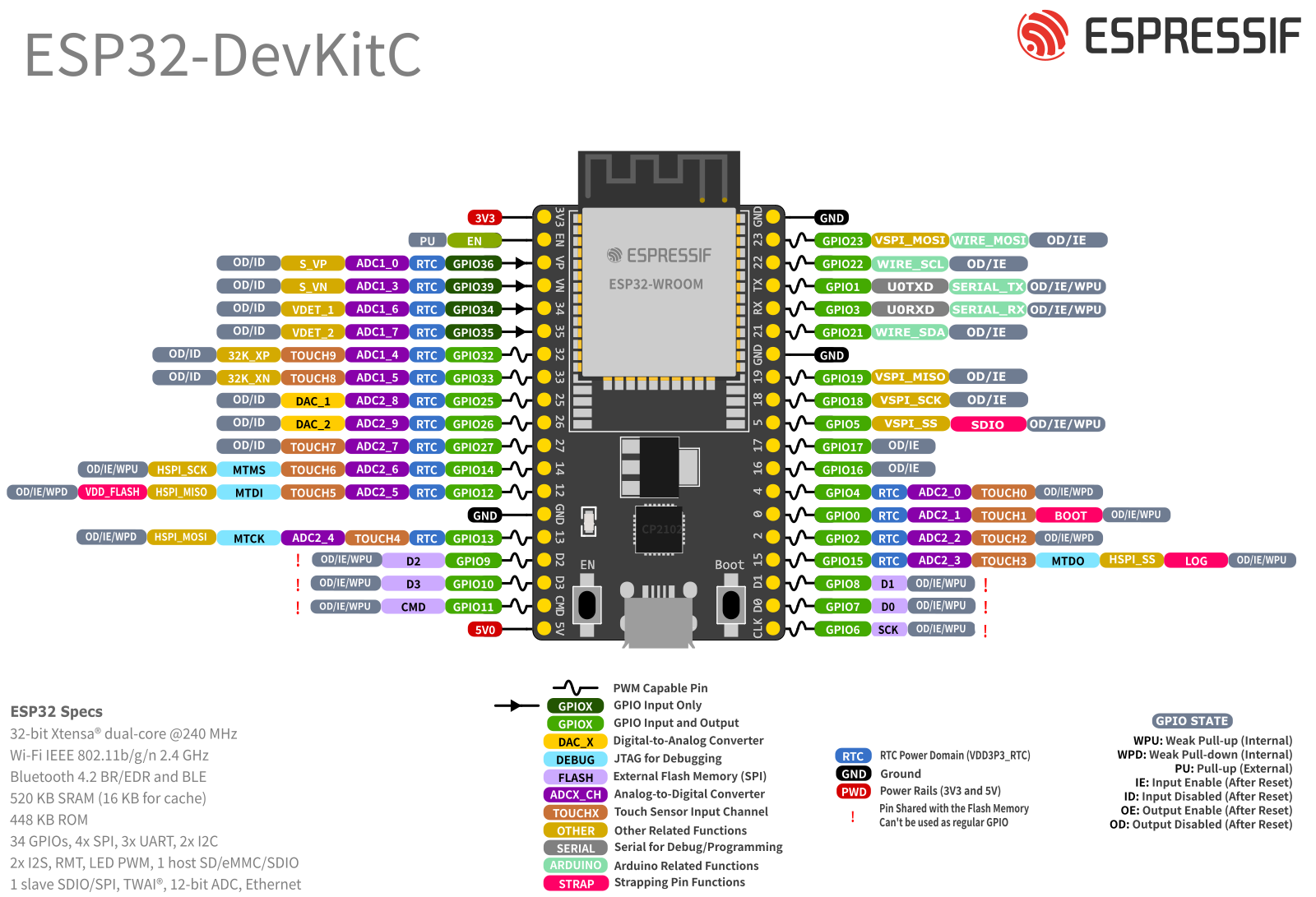
| TROPIC01 Arduino Shield Pin | ESP32-DevKitC-V4 Pin |
|---|---|
| IOREF | 3V3 |
| +3V3 | 3V3 |
| GND | GND |
| GPO | GPIO32 |
| MOSI | GPIO23 |
| MISO | GPIO19 |
| SCK | GPIO18 |
| CS | GPIO5 |
ESP32-S3-DevKitC-1 pin layout here.
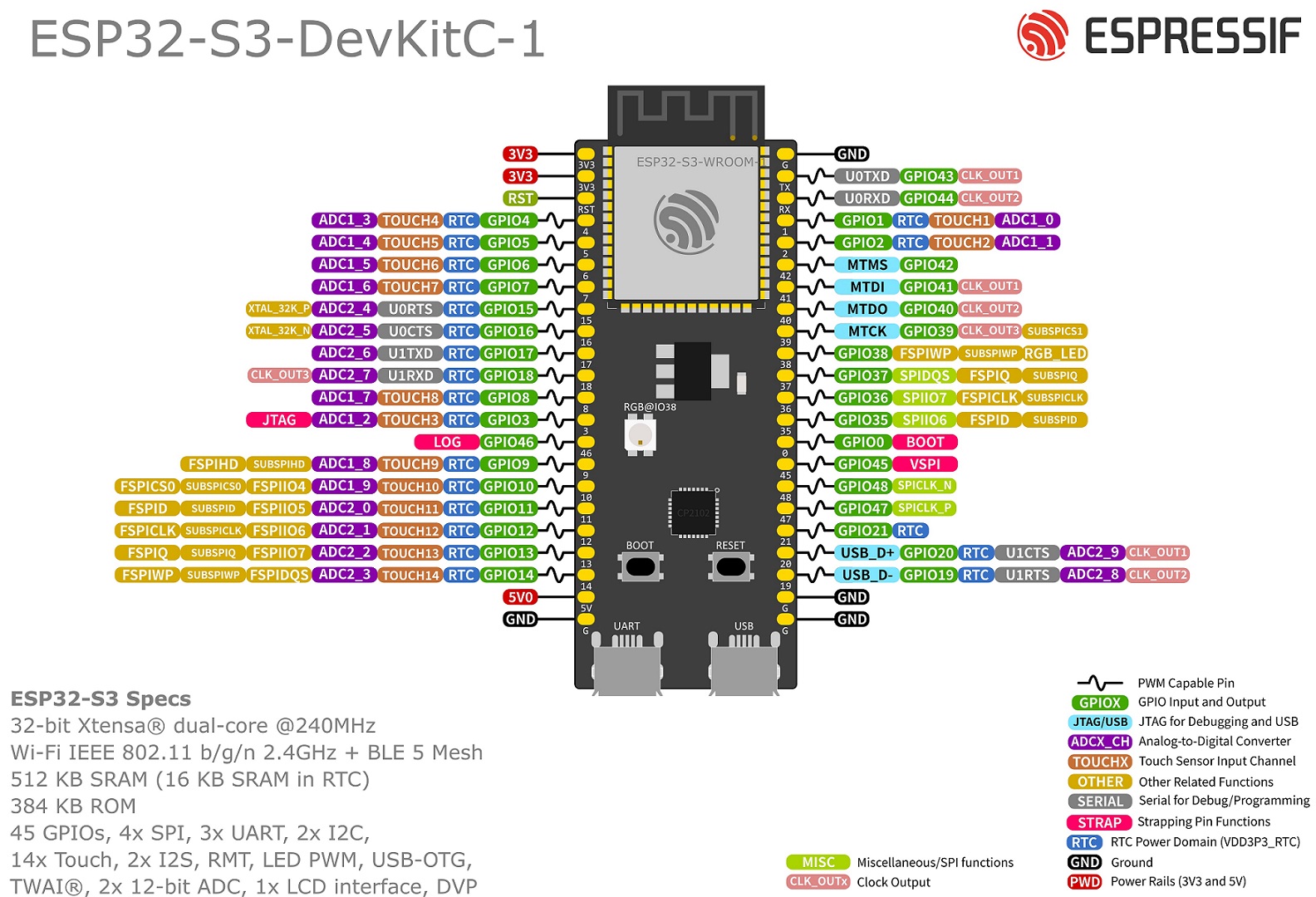
| TROPIC01 Arduino Shield Pin | ESP32-S3-DevKitC-1 Pin |
|---|---|
| IOREF | 3V3 |
| +3V3 | 3V3 |
| GND | GND |
| GPO | GPIO1 |
| MOSI | GPIO11 |
| MISO | GPIO13 |
| SCK | GPIO12 |
| CS | GPIO10 |
ESP32-C3-DevKit-RUST-1 pin layout here.
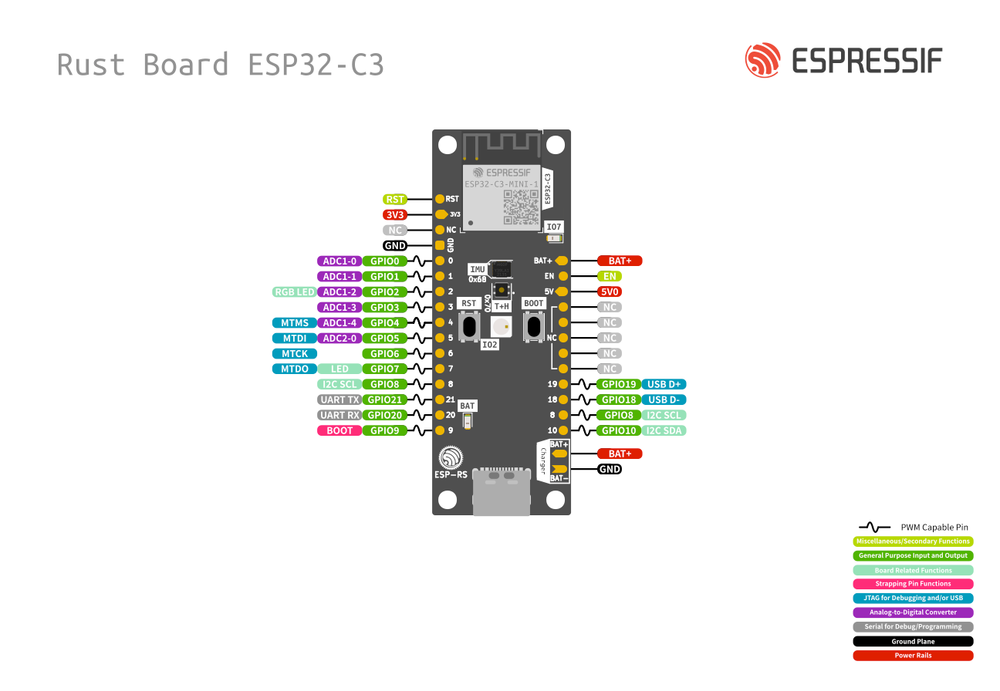
| TROPIC01 Arduino Shield Pin | ESP32-C3-DevKit-RUST-1 Pin |
|---|---|
| IOREF | 3V3 |
| +3V3 | 3V3 |
| GND | GND |
| GPO | GPIO10 |
| MOSI | GPIO1 |
| MISO | GPIO0 |
| SCK | GPIO3 |
| CS | GPIO8 |
How to Use Different Pins?
The pin connections above are used in our examples by default. The pins can be changed in each example's main.c — look for the app_main() function and adjust the initialization of the lt_dev_esp_idf_t structure.
Software Setup
See below for instructions based on your OS:
Installation Instructions
- Setup ESP-IDF and its dependencies:
- Complete the first 4 steps in the official ESP-IDF setup guide.
- We recommend getting the 5.5.1 version, but any 5.x.x version should work.
- Get the Libtropic repository:
- Using git:
git clone https://github.com/tropicsquare/libtropic.git - Or you can download the latest release.
- Using git:
TBA
TBA
Start with our Tutorials!
Do not skip!
We strongly recommend going through each tutorial in this specific order without skipping. You will gather basic information about the chip and update your TROPIC01's firmware, which will guarantee compatibility with the latest Libtropic API.
FAQ
If you encounter any issues, please check the FAQ before filing an issue or reaching out to our support.